Stuck in traffic
Flying Car AI: Put Yourself in a Flying Car
Pick a scene, add your photo, and Flying Car AI makes a 15 second video of you lifting off over traffic.
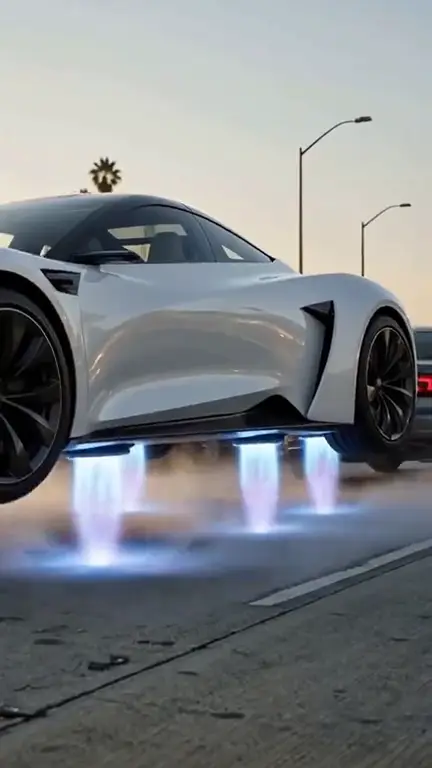
Stuck in traffic
Press Flight Mode and rise over the jam
JPG, PNG or WebP, up to 10 MB. Use a clear, front-facing photo of one adult
What Is Flying Car AI
Flying Car AI is a video maker that puts you behind the wheel of a flying car. You upload a clear photo of yourself, optionally a photo of your own car, and choose one of four scenes: stuck in traffic, tangled in the wires, everyone flies while you drive, or the cop who needs a ladder. In about a minute or two the flying car AI builds a 15 second clip with engine, thruster and street sound, ready to post on TikTok, Instagram Reels, YouTube Shorts or X.
How to Make a Flying Car AI Video
Three steps, no prompts and no editing.
Pick a scene
Choose the story you want: take off over a traffic jam, get caught in overhead wires, drive a road to yourself, or hover while a police officer climbs a ladder. For the traffic scene you also pick a city.
Add your photo and your car
Upload a clear, front-facing photo of yourself as the driver. Add a photo of your own car if you like; without one the flying car AI uses a white electric roadster. One scene needs your car and makes the driver photo optional.
Generate, download and post
Most videos are ready in 1 to 3 minutes. You can close the page; the clip waits in My videos. Download the MP4 and post it.
Four Scenes for Your Flying Car Video
Hover a template to see it play, then press Use template to make your own.
Tangled in the wires
Everyone flies, I drive
The cop needs a ladder
Why People Use This Flying Car AI Maker
The clips in your feed are easy to copy with your own face and your own car; here is what people make.
Day one with a flying car
Make the "my first day with a flying car" video that fills social feeds this week, with you in the driver's seat.
Your city, your traffic
Pick Los Angeles, New York, London or Mumbai and watch your flying car AI clip lift off over a jam you recognise.
Your own car, flying
Upload a photo of your car and show it flying past everyone else on the road.
A gift for a friend
Make a flying car AI video of a friend or a parent behind the wheel and send it to them. It takes one photo and a few minutes.
What Is the Flying Car Trend
On 15 October 2026 Tesla showed a new Roadster at a SpaceX test site in Texas that climbed a curved ramp, drove upside down and flew off the end using cold-gas thrusters. Soon after, people began posting their own AI videos of cars taking off over traffic, and searches for "flying car AI" rose sharply. Flying Car AI lets you join the trend with your own face and your own car instead of someone else's clip.
Tips for a Better Flying Car AI Video
Small choices in your photos change how well the video keeps your face and your car.
Face the camera
Use one person, eyes visible, no sunglasses and no group shots. The tool copies the face it sees.
Show the whole car
For your own car, shoot the whole car in daylight from the side or the front corner, wheels included. A cropped bumper or a dark garage gives the flying car AI less to work with.
Keep the background simple
A car park or a driveway reads better than a busy street full of other cars when you make a flying car AI video.
Try a second scene
The four scenes use different camera angles, and one may suit your photo better than another.
What You Get
The facts about every flying car AI video.
Input
One driver photo, plus an optional car photo. JPG, PNG or WebP up to 10 MB each.
Length and frame
15 seconds, vertical 9:16 or wide 16:9.
Quality and sound
Standard 768P or HD 2K, with engine, thruster, wind and street sound, no music.
Cost
25 credits for Standard and 45 for HD. Credit packs start at 4.99 dollars, with no subscription.
Storage
Photos and videos are deleted after 7 days. You can delete them yourself in My videos.
Credit Packs for Flying Car Videos
Pay once for the videos you want. A 15 second video uses 25 credits, and there is no subscription.
Secure checkout
Payments are processed by Waffo over an encrypted connection. We never see or store your card number.
- Encrypted payment
- Card details handled by Waffo
FAQ
Flying Car AI Questions
What is Flying Car AI?
Flying Car AI is a web tool that makes a short video of you in a flying car from a photo. You upload your photo, optionally add your own car, pick one of four scenes and get a 15 second MP4 with sound. You do not write prompts, edit clips or install an app.
How much does a flying car AI video cost?
A Standard video uses 25 credits and an HD video 45. Credit packs start at 4.99 dollars for 30 credits, which covers one video, and go down to about 2.50 dollars a video in the larger packs. There is no subscription. If a video fails, the credits go back to your balance.
Do I need a photo of my car?
No. For most scenes the driver photo is the only one you need, and we use a white electric roadster as your car. Add your own car if you want it in the video. The scene where everyone else flies and you drive needs a photo of your car.
Whose photo can I use?
Your own, or an adult who agreed. Use one clear, front-facing face. Photos of children and public figures are not accepted, and there is no face swap: the video is made new from your photos and a written scene.
How long does it take?
Most flying car videos are ready in 1 to 3 minutes. You can close the tab while it works. When it is done the video is in My videos, where you can watch it again or download the MP4 for 7 days.
Is this the car from the viral demo?
No. Flying Car AI is an independent tool and is not affiliated with Tesla or SpaceX. It does not use their footage or designs. Each video is a new AI-generated clip built from the photos you upload, and it is labelled as AI-generated.
What happens to my photos?
Your driver photo and car photo are used only to make your flying car AI video. They are not sold and not used to train models. They are sent only to the AI model and safety-check providers that make and check your video. Photos and finished videos are deleted automatically after 7 days, and you can delete them yourself at any time from My videos.
Why did my flying car AI video fail?
Usually a photo was too dark, too cropped or blocked by our checks, for example a photo of a child or a public figure. Your credits come back automatically. Try a sharper photo, or another scene, and run the flying car AI again.
Can I post the video on TikTok or Instagram?
Yes. Videos download as MP4 in 9:16 for TikTok, Reels and Shorts, or 16:9 for YouTube and X. The video is yours to share. Please say it is AI-generated when you post it, and do not use it to suggest a real event happened.
Make Your Own Car Fly
One photo, one scene, and a flying car AI video in a few minutes.